
The Best AI Caption Writers For Small Businesses (And How To Use Them Fast)
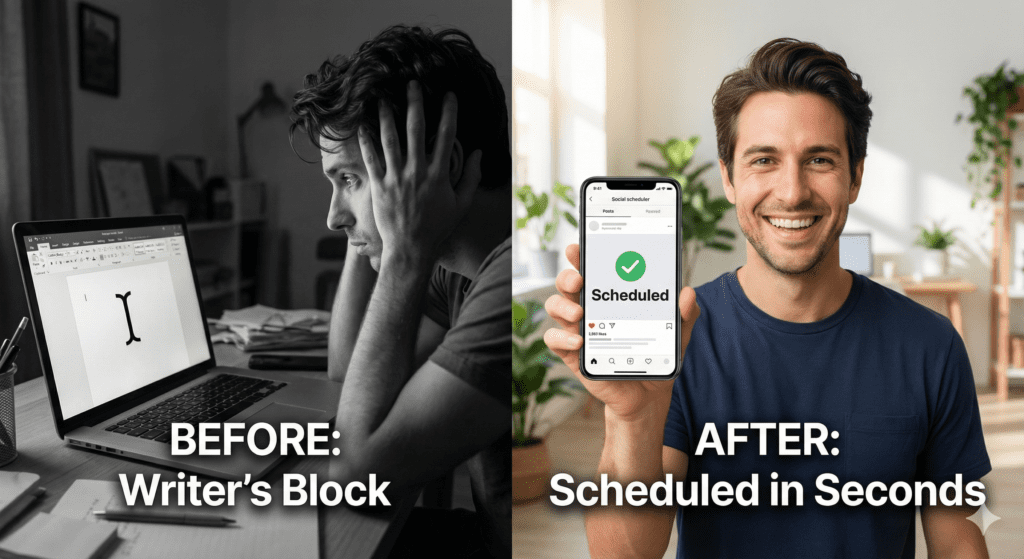
If posting captions slows you down, you are not alone. Most small business owners spend more time staring at the blinking cursor than hitting “publish.”
The right AI caption writer can flip that. You give it a short brief, it returns scroll-stopping copy in seconds, and you schedule it for the moments your audience is most active. That is the goal here. This guide compares top options, shows exactly how to use an AI writer fast, and gives you free prompt templates you can steal today.
What makes a great AI caption writer?
When you are posting for a real business, speed and brand control matter. Look for:
On-brand controls: Saved company profiles, reusable tones, and product/audience context.
Multiple AI engines: The ability to choose the model that fits the job and your risk profile.
Compliance and filters: Profanity filters, risky claims checks, and approval workflows so nothing off-brand ships.
Learning curve: A clean editor, presets, and one-click variants.
Scheduling and analytics: Generate, A/B test, and schedule in one dashboard.
Pricing: Try before you buy with a meaningful free tier or trial.
Quick answer to your big questions
What is the best AI caption writer? The best one is the tool you will actually use daily. For small businesses that want writing, testing, and scheduling in one place, FreshSuite (from Through Fresh Eyes) is a strong pick thanks to saved brand profiles, built-in prompts, multiple AI engines, and integrated scheduling with optimal time recommendations.
How to get AI to write a caption? Give it a tight brief, select a tone, ask for short variants with hooks, CTAs, and hashtags, then refine. (See the example workflow below).
Is there a free AI writer? Yes. You can start with free options like ChatGPT, Gemini, or Claude. You will trade convenience and export features, but they work for simple captions.
Head-to-Head: Top AI Caption Tools for Small Business
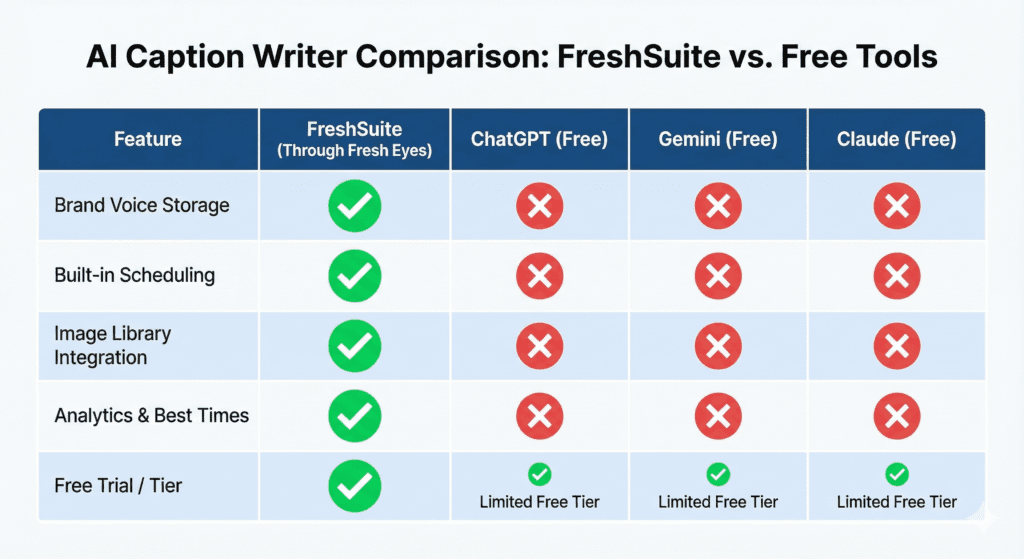
Here is how leading options stack up for small teams that need speed, voice control, and scheduling.
1. FreshSuite (from Through Fresh Eyes)
Best for: All-in-one writing, testing, scheduling, and analytics.
Voice control: Saved company profile with brand story, services, tone, audience, and keywords.
How AI works: Preset business info is stored once. Built-in prompts ask a few quick questions; your answers + presets are combined to generate on-brand captions right inside the AI composer.
Models: Access to leading AI engines within the platform.
Extras: CTA prompts, hashtag manager, 1M+ image library, Canva integration, profanity filter, and approvals.
Scheduling: Calendar view and “Tactical Overlay” for optimal times, plus multi-network publishing.
Price: Monthly plans with a full-featured 14-day free trial (no card required).
2. ChatGPT (Standalone)
Best for: Fast ideation and first drafts.
Voice control: Prompt-based; no built-in brand memory unless you create custom instructions.
Models: GPT-4 class in paid tier; GPT-4o mini or GPT-3.5 class in free.
Scheduling: None (copy and paste into your scheduler).
Price: Free tier available.
3. Gemini (Standalone)
Best for: Concise captions and Google-centric workflows.
Voice control: Prompt-based.
Scheduling: None.
Price: Free tier available.
4. Claude (Standalone)
Best for: Human-like tone and safe guardrails.
Voice control: Prompt-based.
Scheduling: None.
Price: Free tier available in some regions.
Note on Native AI: Many schedulers now draft captions. Check for brand profile storage, multi-model support, and approval workflows before you commit.
If you want the fewest tabs and fastest workflow, a platform that combines an AI caption writer, scheduling, and analytics is a win. FreshSuite’s writer sits in the composer, so your captions, images, hashtags, and queue live together—reducing copy-paste errors and keeping you consistent.
Try your 14-day Free Trial – FreshSuite
How to use an AI caption writer fast
Follow this five-step flow to go from idea to scheduled posts in minutes.
1. Write a two-line brief
Product/Topic: Spring HVAC tune-up, $89 special for first-time customers in Folsom.
Audience/Goal: Homeowners near Folsom; book service this week.
2. Select tone Choose from saved tones in your company profile (e.g., friendly expert, punchy promotional, educational, community-minded).
3. Generate five caption variants
Include a CTA and 3-5 relevant hashtags.
Ask for platform-specific length and formatting (line breaks for Instagram, one-link friendly version for Facebook/LinkedIn).
4. A/B test the best two In FreshSuite, ask for two different posts with distinct hooks or CTAs for similar audiences, then track clicks, saves, and bookings in analytics.
5. Schedule at optimal times Use the Tactical Overlay to pick the best send times per network, then drag and drop into your calendar.
Spotlight: FreshSuite’s Premium AI Writer
Inside FreshSuite (owned by Through Fresh Eyes) you get:
Saved Company Profile: Preset your brand story, offers, tone, keywords, and audience once so every caption stays on voice without retyping basics.
Built-in Prompts: The composer asks a few quick questions; your answers combine with your saved profile to produce high-quality, on-brand results inside the AI platform.
Multiple AI Engines: Switch between leading models without leaving the composer.
CTA and Hashtag Prompts: Roll in call-to-action ideas and hashtag sets with one click.
Image Support: Choose from a 1,000,000+ royalty-free library or pull from Canva.
Scheduling and Analytics: Plan in the drag-and-drop calendar, use Tactical Overlay for optimal times, then measure clicks, leads, and revenue attribution.
You can start a full-featured 14-day free trial, no credit card required, and see how fast your weekly content gets done.
Tip: If you also run multi-channel campaigns, check out how FreshSuite supports integrated marketing campaigns with centralized planning and measurement.
Try your 14-day Free Trial – FreshSuite
The “Free-Only” Tool Stack
If you are on a zero-dollar budget today, use this combo:
ChatGPT free or Gemini free to draft.
Native platform planners to save ideas.
Your current scheduler’s free tier to publish (or post natively).
This path works, but you will do more copying and manual scheduling. When you are ready, a unified platform reduces steps and gives you better timing data.
Prompt templates you can copy
Use these as is. Replace the brackets [...] with your details. Ask for five options each.
Write 5 caption options under 150 characters for [offer] for [audience]. Tone: [tone]. Include 3 branded hashtags and 2 location hashtags. Add a clear CTA to [action]. Add line breaks and one emoji.
Write 5 caption options, 2 to 3 sentences each, for [offer]. Tone: [tone]. Include a soft CTA to [action] and a short link placeholder [link].
Draft 5 professional, value-forward post intros about [topic or offer]. Tone: credible and helpful. 1 to 2 short paragraphs, end with a question to invite comments. No more than 2 hashtags. Respect LinkedIn post dimensions.
TikTok
Create 5 caption lines for a 10 to 15-second video about [offer]. Hook in the first 60 characters, add 4 niche hashtags, and a CTA to [action]. Keep it punchy.
A Simple Decision Checklist
[ ] Do you need brand voice consistency across a team?
[ ] Do you want multi-model access for different content types?
[ ] Do you need approvals, filters, and compliance controls?
[ ] Do you want to A/B test hooks and CTAs quickly?
[ ] Do you need optimal time scheduling with clear analytics?
[ ] Do you prefer one dashboard over many tabs?
If you are nodding “yes,” try FreshSuite’s Premium AI Writer. Generate on-brand captions, test variations, and schedule at the best times from one screen.
Helpful resources while you evaluate
If you want an all-in-one AI social media post generator that plugs right into scheduling and analytics, explore FreshSuite.
Planning a full calendar this quarter? Grab a content planner for social media to build a repeatable cadence.
Want to post when your audience is most active? Check our guide to the best time to post on Instagram.
Wrap up
The best AI caption writer is the one that turns your ideas into scheduled posts with minimal steps, keeps your brand voice consistent, and tells you what worked.
You can get started today with a free-only combo of ChatGPT/Gemini plus your current scheduler. Or, you can move to a unified workflow with FreshSuite: write your brief, select tone, generate variants, and schedule at optimal times using the Tactical Overlay.
Either way, use the templates above, keep your captions short, include a clear CTA, and publish when your audience is ready to engage.