
Social Media for Concrete Coating: Visual Proof That Sells
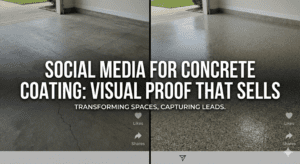
You can turn simple before-and-after shots into high-converting social posts that drive calls and estimates. Shoot a dusty prep slab, a glossy wet pour, and a tight close-up of texture. Use natural light, a tape line or broom for scale, and two photos with a proven layout. Edit for true color, crop distractions, and add a small logo. Post as a carousel or reel with a short benefit-led caption — keep going to get templates, angles, and scheduling tips.
Key Takeaways
- Post clear before/after photos with consistent angles and tight crops to showcase texture and coverage. Use FreshSuite to schedule these posts in batches so you get a week of content done in minutes — saves time and keeps your feed professional.
- Include close-up process shots (wet coat, roller strokes, prep) to build trust through transparency. FreshSuite’s image library and caption templates make posting process shots quick and consistent.
- Use true-to-life color edits, tasteful logo placement, and background cleanup for professional credibility. FreshSuite helps you apply simple branding across images so you look polished without extra work.
- Share short reels/carousels demonstrating application, color options, and maintenance to educate and convert. FreshSuite automates posting and lets you reuse clips across platforms to reach more homeowners.
- Schedule regular posts with caption templates (job, problem solved, materials, CTA) and track engagement-to-lead metrics. FreshSuite saves you time, keeps your brand consistent, and helps turn followers into customers.
Concluding thoughts: Use social media and FreshSuite to save time, look professional, and win more customers.
CLICK HERE TO START YOUR 14-DAY FREE TRIAL
Quick Start: Post a Concrete-Coating Before/After in 10 Minutes
Grab two photos, open FreshSuite, and you’re 10 minutes away from a clean, trust-building before/after post for a concrete coating job.
You’ll use Before Templates to drop images into a proven layout, then apply Angle Tips so each shot shows texture and coverage clearly.
Add Smart Lighting adjustments to make colors pop without over-editing.
Place Quick Props — a tape line, a broom, or a branded sticker — to give scale and context, then crop for a consistent feed.
Pick a Caption Hooks option in FreshSuite’s AI writer to spark homeowner interest: short, benefit-led lines work best.
Schedule it, and you’ve created a professional post that builds trust and saves you time.
Capture Pro Concrete-Coating Before/After and Process Shots
Once you’ve got a clean before/after framed, take a few extra minutes to capture pro-grade process shots that show how the concrete coating comes together. Use natural lighting when possible, shoot close-ups of wet textures, and document crew steps with protective gear visible — homeowners trust the safety and care. Vary your compositions to tell the story quickly.
- Show the prep: cleaning, cracks, and staging props that hint at the finished use.
- Capture application: roller strokes, squeegees, and those glossy wet textures.
- Finish details: edges, texture blending, and workers in protective gear.
Keep angle variety and consistent labeling so you can drop images straight into FreshSuite and post without extra editing.
Edit Photos + Captions That Build Trust (Templates You Can Copy)
Often, you’ll get better engagement when photos look clean and captions tell a clear story—so edit for bright, true-to-life colors, crop tight on the work, and write captions that explain what you did, why it mattered, and how homeowners benefited. Use Lighting Angles to highlight texture, then apply subtle Color Correction so coatings match what clients saw in person. Use Crop Focus to remove distractions and show detail—before/after side-by-sides work great. Do Background Cleanup to erase tools, trash, or cars that undermine professionalism. Add tasteful Logo Placement in a corner so people remember your brand without covering the work. Caption template: “Job, location, problem solved, materials used, time saved, homeowner reaction.” FreshSuite helps you store templates and batch-post so you’re consistent and stress-free.
Reels, Carousels, and Stories That Turn Views Into Leads
You’ve got clean photos and captions—now turn them into content that pulls people in and sends leads to your inbox. Use reels, carousels, and stories to show real work quickly: short tutorials that solve homeowner questions, client testimonials that build trust, and tool closeups that prove your skill. Mix formats so viewers see process, finish, and care.
- Reel: quick demo or short tutorials (mix tips and speeded footage)
- Carousel: before/after plus color comparisons and maintenance tips on slide captions
- Story: client testimonials, Q&A stickers, and swipe-up or DM CTAs
Keep each piece short, helpful, and repeatable. FreshSuite schedules and captions these fast so you stay consistent and get leads without extra stress.
Weekly Posting Workflow for Busy Contractors (10-Minute Plan)
If you only have ten minutes a week, you can still show up online and win jobs—here’s a simple workflow that gets a week’s worth of posts done fast.
Spend 5 minutes batch shooting: three quick before/after photos, one jobsite detail, and one crew shot. Use FreshSuite’s Queue templates to drop those images into a weekly Daily cadence—morning homeowner proof, midweek process, weekend finish.
Spend 3 minutes on Caption shortcuts: prewritten lines you tweak for each photo (problem, solution, call to action).
Add Hashtag sets for your service area and concrete coating niche so you don’t type tags each time.
In the last 2 minutes, schedule and hit publish. You’ve got consistency without the stress.
Track What Works: 3 Tests and Metrics to Grow Paid Estimates
Start tracking so you stop guessing which posts actually turn into paid estimates. You’ll run three simple tests to improve lead quality and conversion rate without wasting time. Check ad frequency so prospects don’t tune you out. Test landing pages to see which layout or call-to-action turns clicks into booked estimates. Use A/B testing captions to find the tone that gets homeowners to message or call.
- Rotate ad frequency and measure lead quality to avoid burnout and wasted spend.
- Swap landing pages and track conversion rate from click to booked estimate.
- Run A/B testing captions on similar photos to see which words drive contact.
FreshSuite helps automate these tests, so you get results fast and keep evenings free.
Frequently Asked Questions
How Do I Get Client Permission to Post Their Project Photos?
Get written consent using a simple model release form; offer client incentives and privacy options, include a photo credit line, and store their written consent in FreshSuite so you’ve proof and can post confidently.
What if My Job Site Is Messy and Unphotogenic?
You can still sell work: use Before/After shots, stagingTips like clearing tools, lightingHacks with phone flash or reflectors, closeupsTextures to highlight finish, and minimalCleanup tricks to tidy focal areas before you shoot with FreshSuite’s scheduling.
Can I Repurpose Manufacturer Images Legally?
Yes — you can, but you must check image rights, usage licenses, credit requirements, brand guidelines, and stock restrictions first; if terms allow, use images and follow FreshSuite’s guidance to stay legal and protect your business.
How Do I Price Concrete Coating Services Shown Online?
You’ll use market based pricing with package tiers, combine square footage and hourly estimating, and highlight value adds to justify rates; FreshSuite helps present packages consistently so prospects see clear choices and trust your pricing.
Will Freshsuite Post for Me or Just Schedule Drafts?
FreshSuite does both: you get automated scheduling plus optional account management where we post for you. You’ll control posting frequency, keep content ownership, have analytics access, and request emergency edits whenever you need them.
Concluding Thoughts
You’ve got the work, the eye, and the results — now let FreshSuite help you show them. Post sharp before/afters, short process clips, and captions that answer homeowners’ doubts. Use FreshSuite’s templates and the 10-minute weekly workflow to batch posts fast. Try the three simple tests we suggest, and track views-to-leads so your posts turn into paid estimates instead of just likes.
Consistency and visual proof sell. Treat each post as a mini-portfolio. FreshSuite saves time, makes you look professional, and helps you get more customers.
Start using FreshSuite and turn your work into calls tonight.